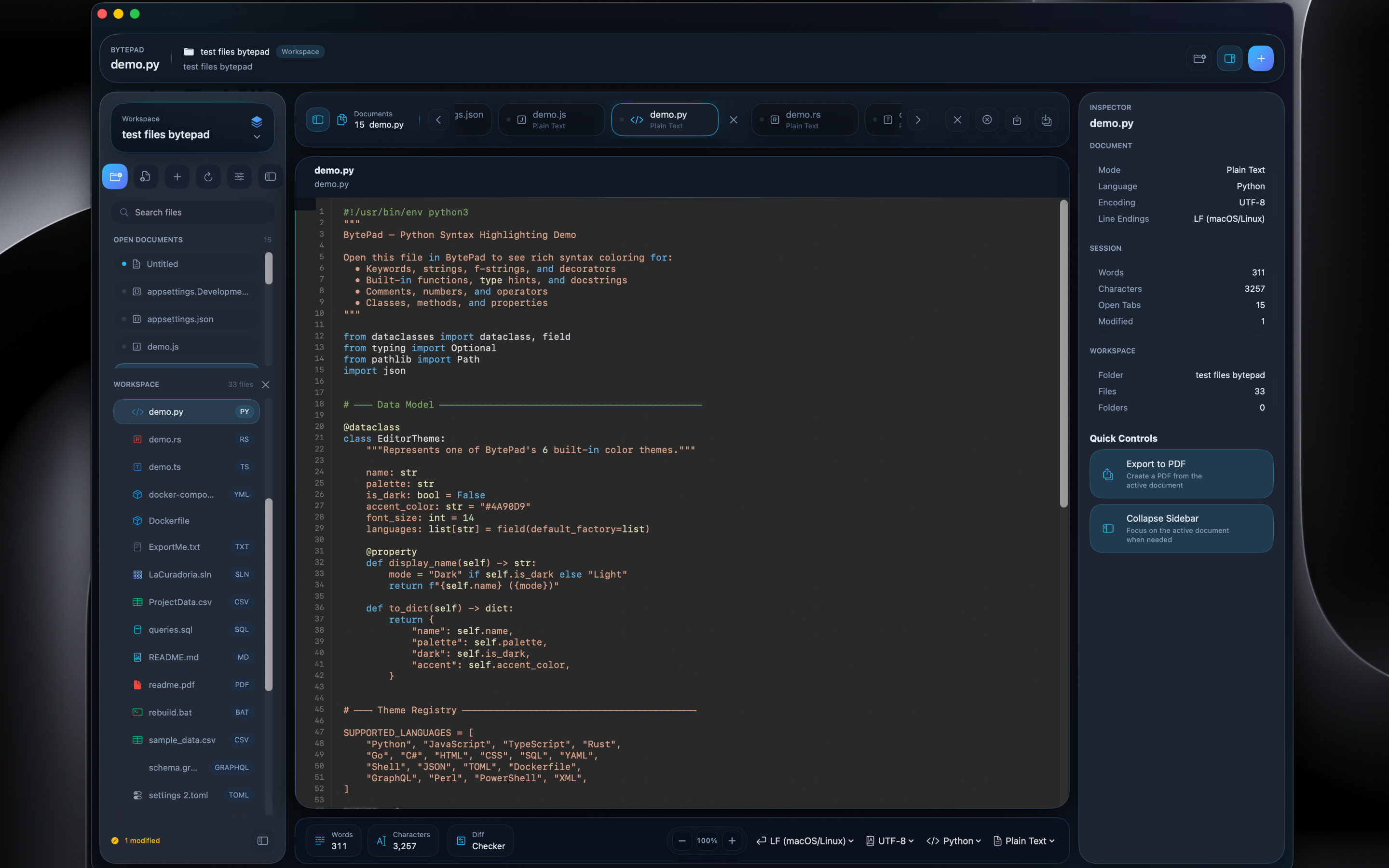
BytePad is a powerful native macOS editor with syntax highlighting for 18+ languages, an integrated terminal, live Markdown preview, CSV table editing, and beautiful themes — all built purely with Apple frameworks.
import Foundation
/// A high-performance text buffer
class TextBuffer {
private var content: String
private var lineCount: Int
init(text: String = "") {
self.content = text
self.lineCount = text.components(
separatedBy: "\n"
).count
}
func insert(_ str: String,
at pos: Int) {
let idx = content.index(
content.startIndex,
offsetBy: pos
)
content.insert(
contentsOf: str, at: idx
)
}
}
A carefully crafted set of tools that cover every editing workflow — from quick notes to complex codebases.
Syntax highlighting with regex-based token matching for keywords, strings, comments, numbers, functions, types, operators, and booleans. Auto-detection from file extensions, shebangs, and content analysis.
Unlimited tabs with session persistence. Dirty indicators, context menus, drag-and-drop — your workspace restores exactly as you left it.
Bookmarks, find & replace with match counting, comment toggling, word wrap, and zoom from 50% to 300%.
Native support for Plain Text, Markdown, JSON (with pretty-print), CSV, and PDF viewing — all in one editor.
System Mono, Menlo, Monaco, and Courier New — pick the typeface that feels right for your workflow.
Built entirely with Apple frameworks — Cocoa, WebKit, and Foundation. No Electron, no web views for editing, no bloat. Pure native macOS performance that launches instantly and respects your system resources.
Eight distinct token types — keywords, strings, comments, numbers, functions, types, operators, and booleans — each precisely colored by your chosen theme. Language detection works automatically from file extensions, shebang lines, and inline hints.
from http.server import HTTPServer
from handlers import Router
def create_app(port=8080):
# Initialize the server
server = HTTPServer(
("localhost", port),
Router
)
print(f"Running on :{port}")
return server
create_app().serve_forever()
A full Markdown editing experience with a 16-action formatting toolbar, live HTML preview via WebKit, and three layout modes — split view, editor only, or preview only.
# Getting Started
Welcome to **BytePad**, a native
macOS text editor built with
*zero dependencies*.
## Features
- Syntax highlighting
- Integrated terminal
- Live preview
- CSV table editing
> Built entirely with
> Apple frameworks.
Welcome to BytePad, a native macOS text editor built with zero dependencies.
Built entirely with Apple frameworks.
View and edit CSV files in a native table view with proper quote handling, editable cells, auto-sizing columns, and real-time sync between the text editor and table. Three layout modes let you work the way you prefer.
| Name | Role | Location | Status |
|---|---|---|---|
| Alice Chen | Engineer | San Francisco | Active |
| Bob Smith | Designer | New York | Active |
| Carol Wu | Manager | London | On Leave |
| Dan Park | DevOps | Toronto | Active |
| Eve Larsson | Analyst | Stockholm | Active |
| Frank Diaz | Engineer | Austin | Remote |
A full POSIX PTY terminal embedded in every tab. 256-color support, async I/O, shell keybindings, scrollback history, and bracketed paste — without ever leaving your editor.
forkpty — not emulateddaniel@mac~/projects$ls -la total 48 drwxr-xr-x 6 daniel staff 192 Feb 14 09:30.drwxr-x---+ 18 daniel staff 576 Feb 14 09:15..-rw-r--r-- 1 daniel staff 1247 Feb 14 09:30 main.swift -rw-r--r-- 1 daniel staff 3842 Feb 14 09:28 README.md -rw-r--r-- 1 daniel staff 8192 Feb 14 09:25 data.csvdaniel@mac~/projects$swift build Compiling BytePad (12 sources)...Build complete!(1.84s)daniel@mac~/projects$_
Choose from six hand-crafted color palettes, each with light and dark variants. BytePad follows your macOS appearance setting automatically, or lets you override it.
BytePad integrates natively with Apple Intelligence features available on macOS — giving you powerful writing assistance without leaving the editor.
Rewrite sentences with different tones — professional, casual, concise, or friendly — using the system-level rewriting tools built into macOS.
Speak and watch your words appear in the editor. macOS dictation works seamlessly with BytePad's native text system.
Proofread, summarize, and create key points with Apple's system-wide Writing Tools — available anywhere you can select text in BytePad.
Write and navigate code with syntax highlighting for 18+ languages, an integrated terminal, and keyboard shortcuts you already know.
Author Markdown documents with live preview, a formatting toolbar, and instant visual feedback — all in a split-pane view.
Open CSV files and instantly see them as formatted tables. Edit cells inline, copy rows, and toggle between raw text and table views.
Take notes, edit configs, review PDFs, and run commands — all from a single lightweight app with zero setup required.
Try BytePad Pro free for 14 days. macOS 13.0 or later required.
14-day free trial · $9.99 one-time